
Here’s the difference between a non-mobile and mobile website:
|
|
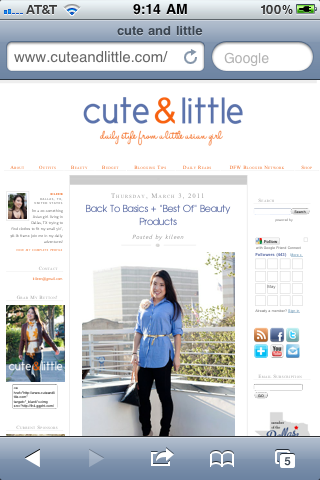

Have you ever looked at your blog on a mobile device like a cell phone and been dismayed at how small everything is and ended up squinting just to read the title of your blog posts? Well, dismay no more! You need to enable a mobile template for your blog. Good thing is, it’s as easy as checking a box. No tech savvy-ness needed!
To enable mobile viewing on your website, go to Blogger’s Beta Dashboard at http://draft.blogger.com. Then select Settings -> Email & Mobile and check the first radio box to enable mobile viewing. Save your changes.
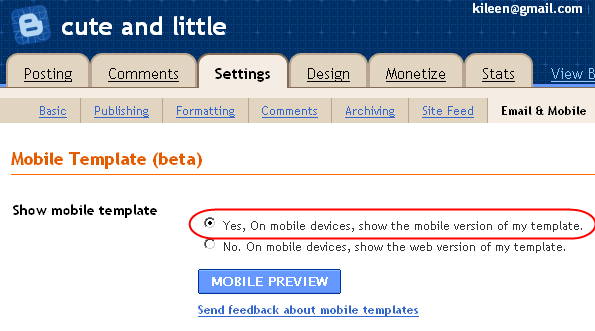
And that’s it. Note that when you go to your blog homepage, you will now see a landing page that has a preview of the posts with arrows to view the entire post. You should immediately notice how much quicker it is to load your blog!
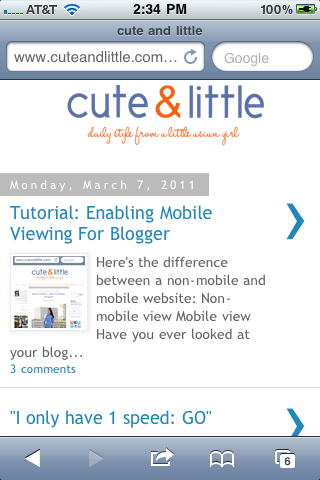
And now, each blog post is much easier to read on small mobile devices. 🙂

P.S. Check out some of my other blogging tips, including tutorials on setting a custom favicon and how to create a ShopStyle widget to earn money from your blog!
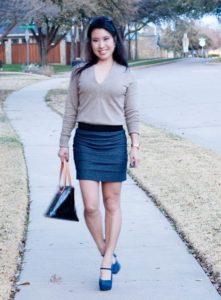
P.P.S. And if you’re wondering whether I got dressed today, you’re in luck. 🙂
Follow Me | Twitter | Facebook
Ask me anything on FormSpring





Thanks for the tip, Kileen! I already have this enabled. hehe ^_^
I think mobile viewing is good in that it's easier to read blog posts, but honestly, I hate it.
I find that blogs that have the mobile viewing enabled, I always click to view the web version, because I find that I enjoy looking at the layout of the entire page, the colors and the fonts and the whole package. If I'm clicking over from my google reader, I've already read the post and I don't need for it to be easy to read. If I'm new to the blog, and I land on the main blog page (like http://cutenlittle.wpengine.com), I hate that you only see one image per post for the first two or three posts, and then there's no images for the next couple. Most of the blogs that I read are photo-driven, so I dislike not being able to just scroll down and see all their pictures, you have to click on every single article individually. Plus, when you do click into an article, the images always turn out super grainy because they compress them way too much!
Anyway, there's my opinion. Haha!
the drawback is that you don't see a bunch of pictures from the posts, just
one snapshot and that's it. but at least there is the option to "View Web
Version" at the bottom of the mobile view. 🙂
Yes! I'm just annoyed that I have to scroll to the very bottom to get to the "view web version" – I wish they had that button at the top as well. It's the only thing I ever click on!
But hey, everyone has their own opinions, and it seems like most people like the mobile versions. I'm just a weirdo 🙂
Thanks for sharing the tips! Enabled..check!
nice blog…happy can visit here…
nice to meet you^^
Thanks lovely! Done and DONE!
ooh, you're awesome thanks so much for sharing this, just updated mine. xx veronika
I lvoe your how to tutorials. They are easy to understand, and have really helped my blog. Thanks again!
http://cutenlittle.wpengine.com/2011/03/tutorial-enabling-mobile-viewing-for.html
Hhmmm….tried to update, but didn't get it completely. I'll spend some more time with it tomorrow (don't worry I'll get it 😉 You're tips are very helpful, thank you for taking the time to share !
I remember you instructing me on Twitter how to do this! I really like this option as well, makes it so much easier to comment and not have to expand the page and all of that.
Wow – I had no idea. Thanks for all your blogger tips!
Oh that is so cool and very helpful! I should do that right now! Do you have a tutorial for Mr. Linky thingy babe?
besos,
ML
Join the Easiest Blog Project Ever at:
Twenty York Street
Twenty York Street
thanks for the tip!
For Linky Tools just create an account and pick what kind of Linky setup you want. I'm using thumbnails. It's seriously too easy! Let me know if you have specific questions. 🙂
Kileen
Great work keep it coming, best blog on earth
aromatherapy world
Great work keep it coming, best blog on earth
aromatherapy world
Your blog looks nice, even so it would be far better if you’ll be able to use lighter colors too as a professional design. This will make sure that a lot more readers come to check it out.Informative post by the way!
nolvadex
Great tip!
Kileen….YOU ARE THE GREATEST! Thank you for sharing these blogging tips and site improvements! I am not tech savvy at all and this is just what I needed! THANK YOU!!!