
I recently figured out (thanks to a tremendously helpful email from Elaine!) how to create a lovely customized ShopStyle widget to include in my posts:
My Current Lemmings:

And since I was actually stumped on how to create this widget for awhile, I thought I’d write up a brief tutorial to explain to anyone else who is wondering the same thing.
- Create a ShopSense account here.
- Go to ShopStyle and log in using that account.
- Search for your items and “Favorite” the ones you want to include in the widget.
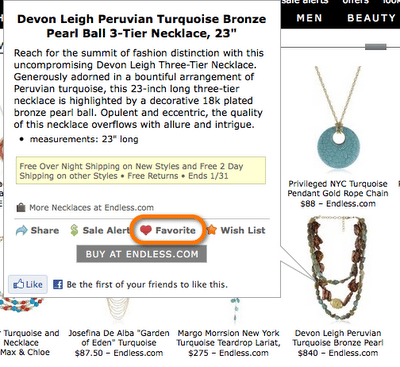
- Once you’re done favorite-ing your items, then go back to ShopSense.
- Go to Tools -> Layout Editor. Then click the link to Launch Layout Editor.
- You should now see your favorite items on the left-hand side. Simply drag your items to the layout. The positioning of the items doesn’t matter as the actual layout will not be used.
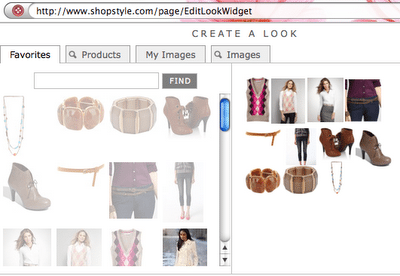
- Make sure you click the Save button on the bottom right once you are finished with the layout. The Save button will disable for a few seconds while the layout is saving. Wait until the Save button becomes reenabled before continuing.
- Go back to your original ShopSense window and now select Widgets -> Look
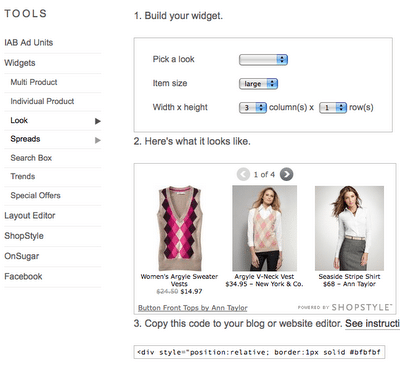
- Under Step 2, you should now see a widget created that contains all of the items contained in your previous layout. Now just copy the code provided in Step 3 and paste it into the HTML source of your post.
- That’s it! Now you will get a small commission for every link clicked through from your widget. 🙂


I hope this was helpful!

P.S. In case you missed it:
- Giveaway: Kate Walsh Boyfriend Fragrance and Train Case Kit. Win before you can buy! Ends Fri, Jan 28. Tweet daily for additional chances to win! (click to tweet)
- Color Brigade Vol 3 – 24 entries and counting! Did you enter yet? 🙂
Follow Me | Twitter | Facebook
Ask me anything on FormSpring









Thanks for doing this Kileen!! I couldn't for the life of me figure it out 😛 I'll try and play around tonight.
That's neat. Thanks for sharing! I'll be so tempted to shop if I had that on my site hehe.
nice one! thanks for sharing 🙂
How cool….what a great tutorial hunnie…perhaps you would like to help with the "how to" column at the Fashion 411 mag? email me if you are…[email protected]….Id love to have YOU:)
Stop by and say Hello:)
Enter my e.l.f Cosmetics Giveaway!!♥
This is so neat. I really should get myself more familiar with different sites/apps. Thank you for the tutorial, Kileen!
Thanks for the tutorials!! These are just wonderful and so kind of you to share. I can't wait to try it out! Thanks!
petitemom.blogspot.com
That's a neat product. It would be nice to that when I don't want to use polyvore.
My Heart Blogged
Thank you so much for this post!!! I have been wondering how to do that and could not figure it out
Really enjoyed reading this post! Very kind of you to share it with everyone. Look forward to reading more from you.
J.L
(www.petite-stylist.com)
So I wasn't the ONLY one who couldn't figure it out. Lol. It's not easy! I'll have to test it out! Thanks for referral Kileen1
no problem. it definitely was NOT intuitive. 🙂
Thank you for posting this! I just started using ShopSense but couldn't figure out how to do this. 🙂
no problem!! 🙂
Wow I was searching for thisfor sometime and I emailed some bloggers and noone helped me! So I really appreciate this post! Cant wait to apply for my next post! By the way would u like to follow each other on gfc and bloglovin? If you can follow me , I will follow back asap!
http://fashionsbit.blogspot.com.tr
http://instagram.com/fashionsbit#
This post was created 4 years ago, but it still works! I'm so glad you could explain how to do that! Thank you so much, you are a lifesaver 🙂
chiconthepeak.org
I want to thank you for posting this! Now I finally know how to link this to my blog! Thank you!!!
Kayla || tllady.blogspot.com
Yay!! So glad I could help!!
Hi K! thanks, I was almost there and got the final tip from this post to get it published 🙂 Thanks.
Thank you sooo much for Sharing.. your tutorial worked like a dream!
http://www.diaryofdocdiva.com
yay!!
How did you create your new Shop This Look widget